
www.simplify-data.de
Automation with n8n: Increasing efficiency in everyday life
Automation with n8n: Increasing efficiency in everyday life
What is n8n?
n8n is an open source workflow automation platform that allows users to create complex processes through a visual user interface. With a variety of integrations and a flexible architecture, n8n is an excellent choice for companies that want to automate their processes without a lot of programming.
Why automation?
Automation can increase efficiency, reduce errors and save valuable time. By automating redundant tasks, employees can focus on more important tasks that require more creativity and human judgment.
Getting started with n8n
You don't need extensive programming knowledge to get started with n8n. The intuitive user interface allows you to create workflows by simply dragging and dropping. Here are the basic steps:
Installation: n8n can be installed locally or in the cloud. A quick way to try out n8n is to use Docker or host it on platforms like Heroku.
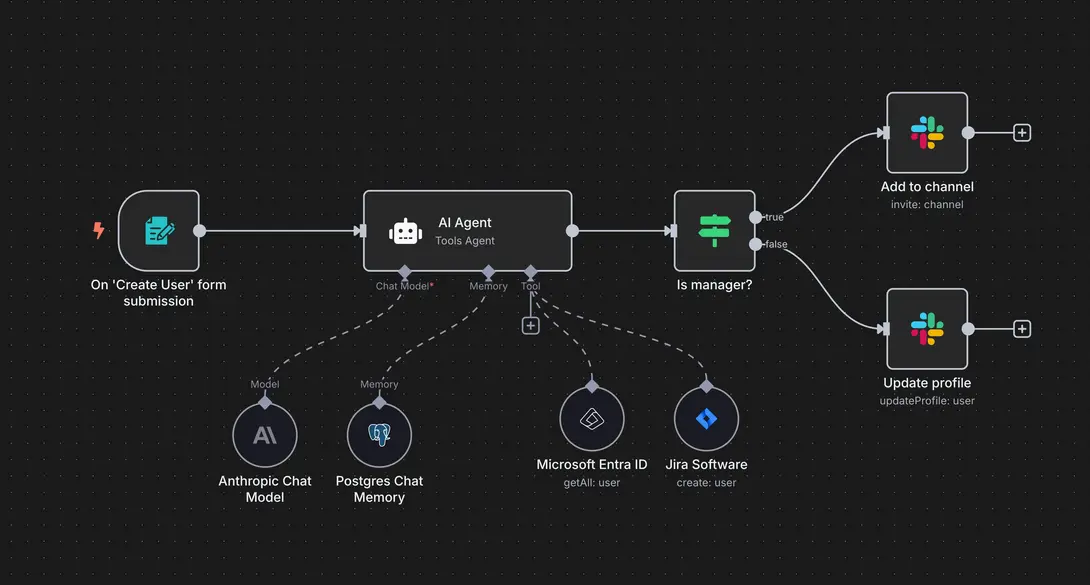
Create a workflow: Use the visual interface to design your processes. Simply drag the required nodes (modules) into the workflow and connect them.
Integration of services: n8n offers a variety of integrations with services such as Google Sheets, Slack, Trello and many others. These can be easily integrated into the workflow to collect, analyze or send data.
Practical application examples
Example 1: Automating social media posts
Imagine you want to share content regularly on various social media platforms. With n8n, you can create a workflow that:
- Extracts content from a Google Sheet
- Posts this content to Twitter, Facebook, and LinkedIn at specified times
This process saves time and ensures consistent content across all platforms.
Example 2: Consolidating customer feedback
Suppose you receive feedback from various platforms such as email, social media, and surveys. With n8n, you can:
- Automatically collect feedback in a central database
- Create a summary of the feedback
- Send notifications to relevant teams
This enables a faster response to customer needs and improves service.
Example 3: Automated invoice processing
Many companies have to regularly process invoices and enter them into systems such as ERP or accounting software. With n8n, you can create a workflow that:
- Retrieves invoices via email
- Automatically converts PDF invoices into text (OCR)
- Extracts data such as amount, invoice number, and supplier
- Enters data into accounting software or collects it in a Google Sheet table
This saves accounting teams a lot of time and avoids errors in manual entry.
Example 4: Lead management and sales
Sales teams benefit particularly from automation. An n8n workflow could, for example:
- Retrieve new leads from web forms or social media ads
- Automatically enter them into a CRM system such as HubSpot or Salesforce
- Send a welcome email to the lead
- Notify the responsible sales representative
This ensures fast response times and increases the conversion rate.
Example 5: Monitoring websites and services
IT or DevOps teams can use n8n to monitor the status of websites or APIs:
- Regularly query the server response or API endpoints
- Check whether services are available or errors occur
- Automatically send notifications via Slack, email, or SMS in case of problems
- Optional: Create automatic restart scripts or tickets in Jira
This minimizes downtime and solves problems faster.
Example 6: Automated data analysis
Marketing or business intelligence teams can use n8n to aggregate data from various sources:
- Retrieve data from Google Analytics, social media, and sales dashboards
- Automatically merge and filter data
- Send a weekly summary via email or Slack
- Optional: Update results directly in Google Data Studio or Tableau
This saves time on reporting and always provides up-to-date insights.
Example 7: Onboarding new employees
HR processes can also be highly automated:
- Create new employees in HR systems
- Automatically create accounts for email, Slack, Jira, or other tools
- Send welcome emails with important information
- Create tasks for the IT or onboarding team
This makes the onboarding process more consistent and less prone to errors.
Tips for optimizing your workflows
- Test your workflows thoroughly before you put them into operation. Use n8n's debugging tools to identify and fix errors.
- Use templates provided by the n8n community. These can serve as a starting point for your own workflows and speed up development.
- Regular review and customization: Automation needs change over time. Review your workflows regularly and adapt them to new requirements.
Conclusion
Automation with n8n can make your day-to-day work much easier and help you to work more efficiently. Whether it's managing data, sending notifications or coordinating complex processes - n8n offers a flexible and user-friendly solution.
If you would like to find out more about automation options or need support with implementation, don't hesitate to get in touch. The experts at Simplify Data GmbH will be happy to help and advise you!